Sync Bridge
For the illustrated installation and automatic deployment workflow, see Center and edge deployment.
Purpose
Sync Bridge synchronizes selected configuration and real-time variables between one public Hub and one or more Edge nodes. The Hub listens for and aggregates Edge connections. Each Edge connects to the Hub and publishes its local mirror.
Configure the forwarding group range and target runtime state through Data Forwarding. This page covers the complete Sync Bridge role, multi-Hub endpoints, mutual-TLS, synchronization, failover, and debug settings.
Before you start
- Create one Sync Bridge target on the Hub and one on each Edge.
- If TLS is required, prepare a server certificate for the Hub and a client certificate for each Edge, and trust the issuing CA on both sides in Development Configuration → Certificate Management. No certificates are required when TLS is disabled.
- Use the same verification token on both sides and a unique local Peer ID for every node.
- Allow each Edge to reach the Hub listening address and port.
Open the plugin
Open Development Configuration → Data Forwarding and:
- Save one Sync Bridge target on the Hub and one on each Edge.
- Fill in the target group, name, enable state, and start timeout.
- In Target properties, choose the role and configure its listen address or Hub endpoint list, identity, and synchronization limits. Select Enable mutual TLS and choose certificates when encryption is required.
- Enable the targets, confirm the Hub and Edge are connected, then run configuration and real-time verification.
Basic target information
| Setting | Default | Configuration |
|---|---|---|
| Group | - | Select a saved forwarding group; an Edge publishes only that group's range. |
| Target name | - | Required and unique within the group. |
| Enable | Enabled | Disable to stop listening or connecting. |
| Log level | Info | Temporarily use Debug for TLS, handshake, or synchronization diagnostics. |
| Start timeout | 60 seconds | Valid range is 1 to 3600 seconds. |
Roles and connection
| Setting | Default | Description |
|---|---|---|
| Role | EdgePublisher | Select HubServer on the Hub or EdgePublisher on an Edge. |
| Local Peer ID | Empty (required) | Use 1 to 100 letters, digits, dots, underscores, or hyphens; every node must be unique. |
| Configuration sync mode | On change and reconnect | On reconnect compares only after connection or a Hub request. On change and reconnect also syncs when the Edge range changes. |
| Listen address | 0.0.0.0:7777 | Address used by the Hub. |
| Hub endpoints | Empty (required on Edge) | Edge tries the endpoint list in order. Each row contains a unique endpoint ID, Hub address, and TLS target host; up to 16 rows. Not used by the Hub role. |
Multi-Hub failover
An Edge keeps its current Hub connection while heartbeats, real-time acknowledgements, and configuration synchronization succeed. A normal idle connection does not trigger a switch.
Failover occurs only after an actual link error, such as a heartbeat failure or timeout, a real-time send/acknowledgement timeout, a configuration-synchronization error, or a closed transport connection. After the current endpoint fails, the Edge tries the next endpoint in HubEndpoints order, then verifies configuration and restores a full snapshot before continuing with real-time updates.
When the primary Hub recovers, the Edge does not probe it and does not automatically switch back from the current backup. If the current backup later fails and a new connection cycle starts, the Edge tries the endpoint list again from the highest priority. The debug page's current Hub, failover count, endpoint states, and latest error show why a switch occurred.
Authentication and TLS
| Setting | Default | Description |
|---|---|---|
| Verification token | Empty (required) | Handshake secret required for both TCP and TLS; Hub and Edge values must match exactly. |
| Enable mutual TLS | Disabled | Both sides must use the same setting. Enable for mutual TLS; disable for TCP with certificate settings hidden. |
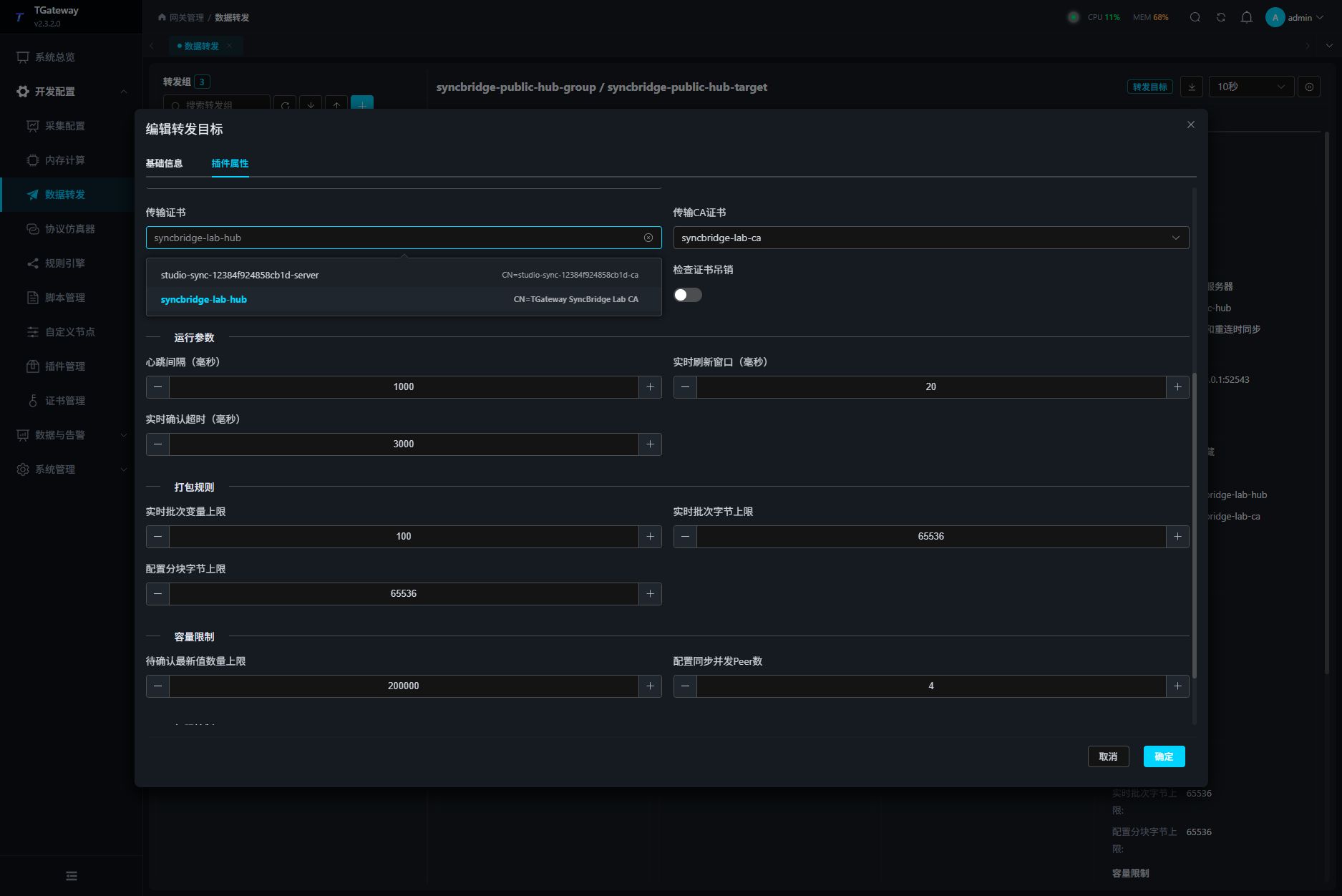
| Transport certificate | Empty (required with TLS) | Select from the dropdown. The Hub lists server certificates; an Edge lists client certificates. |
| Transport CA certificate | Empty (required with TLS) | Select the CA used to validate the peer certificate chain from the dropdown. |
| TLS target host | Configured per endpoint | With TLS enabled, each Edge endpoint must match the Hub certificate DNS name or SAN; the Hub listener role does not use this field. |
| TLS protocol | System default | Select TLS 1.2, TLS 1.3, or both. Selecting System default lets the operating system negotiate and clears explicit protocol selections. The dropdown offers only these three options; SSL 2.0, SSL 3.0, TLS 1.0, TLS 1.1, and other invalid protocol values are rejected. |
| Check certificate revocation | Enabled | Checks whether the peer certificate has been revoked according to the project certificate policy. |
Choose the role before opening Transport certificate. If the required certificate is missing, generate or import a certificate with the correct purpose in Certificate Management, then reopen the dropdown. Changing roles does not replace the saved certificate automatically; confirm its purpose before saving.
Alternatively, use Studio → Site Management → Data Synchronization to connect both gateways, select the Edge forwarding group, and configure and enable synchronization. Enabling TLS in that workflow generates and installs the required certificates automatically, without a synchronization pairing package.
Synchronization and capacity
| Setting | Default | Range | Description |
|---|---|---|---|
| Heartbeat interval (ms) | 5000 | 1000 to 60000 | Connection health-check interval. |
| Real-time flush window (ms) | 20 | 10 to 1000 | Combines variable changes before sending them. |
| Real-time acknowledgement timeout (ms) | 3000 | 500 to 60000 | Maximum wait for the Hub to acknowledge a real-time batch. |
| Variables per real-time batch | 2000 | 1 to 10000 | Maximum variables in one real-time batch. |
| Bytes per real-time batch | 262144 | 4096 to 1048576 | Maximum UTF-8 bytes in one real-time batch. |
| Configuration chunk bytes | 524288 | 4096 to 1048576 | Maximum UTF-8 bytes in one configuration chunk. |
| Concurrent configuration peers | 4 | 1 to 32 | Edge peers the Hub can request configuration from concurrently. |
| Allow reverse RPC | Disabled | - | Allows the Hub to write variables on an Edge; the variable write permission must also allow it. Enable only with explicit site authorization. |
Configuration and real-time rules
- The Hub can request configuration from one Edge or all known Edges.
- The Hub creates mirror devices and variables without collection channels. The device editor displays SyncBridge Mirror and its automatic management description; its plugin cannot be replaced manually. Maintain connection settings on the owning Sync Bridge target.
- Mirrors are internal devices managed by the server and cannot be manually created, copied, or deleted. Device management labels them Internal. A selection containing internal devices cannot be deleted; Clear Devices removes only regular collection devices and retains mirrors and their variables. Protection also applies while a mirror is disabled or offline.
- Internal devices remain editable: you can change their name, description, log level, enabled state, and remarks. Saving these local settings preserves their internal identity and deletion protection.
- Revision, checksum, staged chunks, and one atomic commit prevent partial configuration from being applied.
- Existing mirror variables update only data type, unit, and description. The Hub keeps local names, expressions, alarms, history, and write permissions.
- If an Edge deletes a variable or removes it from scope, the Hub keeps the local mirror and marks the source missing.
- Real-time values are validated by Epoch, Sequence, and configuration revision. The Hub acknowledges applied values, and late values cannot overwrite newer state.
- After reconnecting, configuration is verified first, then a complete current-value snapshot is restored before incremental updates resume.
Target variable properties
This plugin has no additional target variable fields. A variable must already be inside the Edge target's forwarding group. Reverse writes must also satisfy source-variable permission and site safety rules.
Functions
| Function | Purpose |
|---|---|
| Status and peers | Use Status and peers to check the connection state and latest result. |
| Configuration synchronization | Use Configuration synchronization and review the returned result. |
| Send full snapshot | Use Send full snapshot with an approved test point and confirm site safety before execution. |
| Reconnect | Use Reconnect and review the returned result. |
| Export diagnostics | Use Export diagnostics to inspect mapped values, status, counters, recent messages, or the latest result. |
Target debug
Open Development Configuration → Data Forwarding, select the Sync Bridge target, and open Debug → Protocol Debug · SyncBridge.
| Feature | Purpose |
|---|---|
| Status and peers | Shows role, local node, transport state, peer connections, pending counts, latency, and the latest error. |
| Synchronize configuration | Lets a Hub request all or selected configuration from Edge peers. |
| Send full snapshot | Makes an Edge send the current forwarding-range snapshot immediately. |
| Reconnect | Makes an Edge disconnect and establish a new Hub connection. |
| Export diagnostics | Exports connection and synchronization statistics for troubleshooting. |
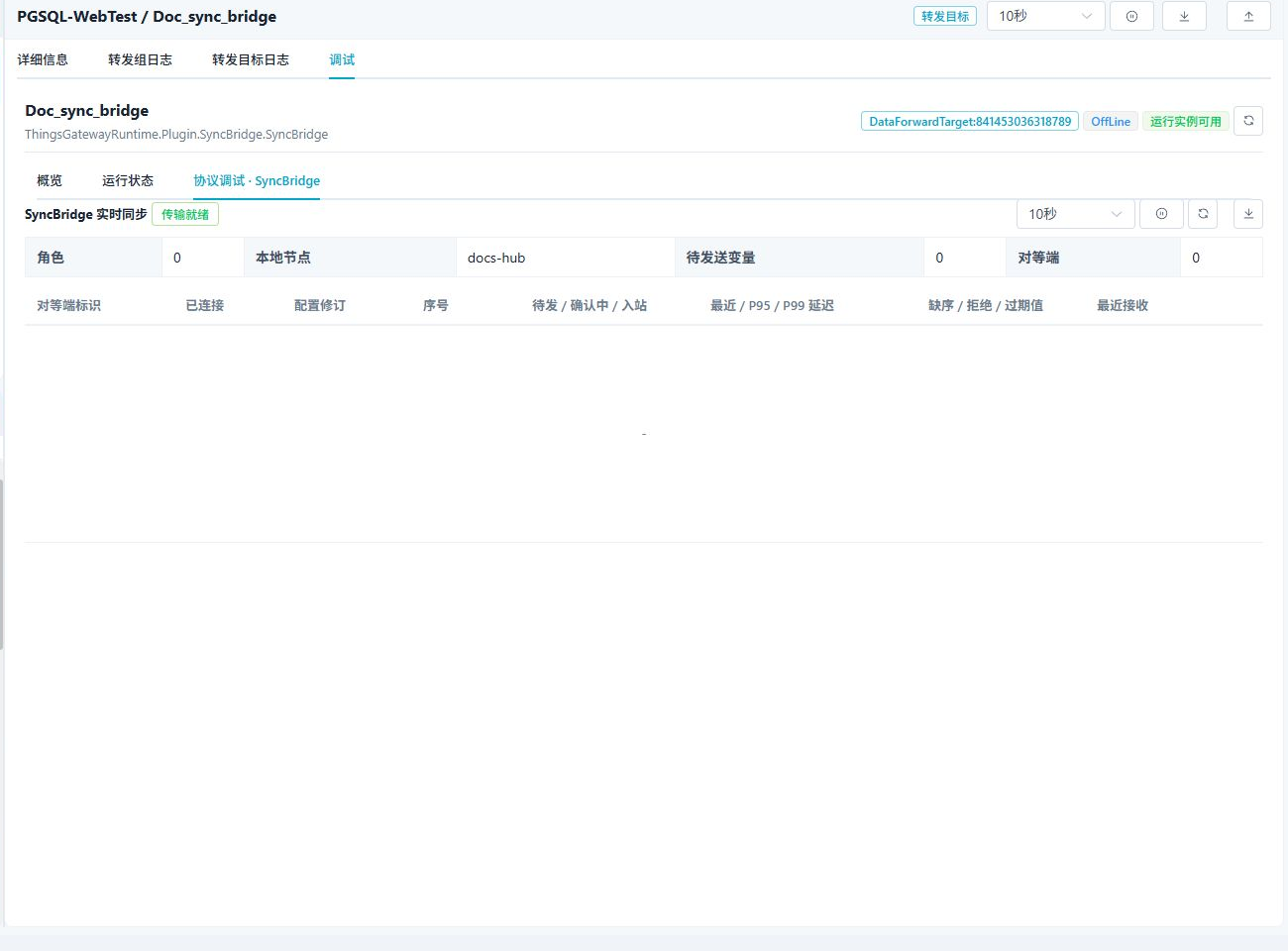
Transport ready means the local listener or connection component has started. A Hub with no connected Edge may still be shown as offline.
Verify the target
- Enable the Hub and Edge targets. Confirm that the Hub debug panel lists the Edge Peer ID as connected.
- Request a single-Edge configuration synchronization from the Hub and confirm matching revision and checksum.
- Change one approved test variable inside the Edge forwarding range.
- Confirm the value, update time, and inbound sequence on the Hub, and make sure pending and inflight counts return to normal.
- Interrupt the current Hub's actual link. Confirm that the Edge switches only after an error to the next endpoint; after the primary recovers, it must not switch back automatically.
- Interrupt the current backup. On the next connection cycle, confirm that endpoints are retried from highest priority and synchronization resumes.
Troubleshooting
| Symptom | Check |
|---|---|
| Edge cannot connect to Hub | Hub listen address, Edge remote address, firewall, verification token, and both target logs. |
| TLS handshake fails | Transport certificate, CA, TLS target host, certificate validity, and revocation check. |
| Connected but no variables arrive | Edge forwarding range, configuration sync mode, full snapshot, and pending count. |
| Configuration does not synchronize | Peer ID, configuration revision, sync mode, then run Synchronize configuration from the Hub. |
| Reverse write fails | Allow reverse RPC, source-variable write permission, value type, and site interlocks. |
| Hub switches while idle | Inspect heartbeat, real-time acknowledgement, and configuration-sync logs. A healthy idle connection is retained; only an actual error or closed connection triggers failover. |
| The primary Hub does not take back the connection | This is expected. The Edge does not probe a recovered primary. It retries the priority list only when the current endpoint later fails and a new connection cycle starts. |
Related links
- Data Forwarding: Edge forwarding ranges and common target operations.
- Certificate Management: Generate or import transport and CA certificates.
- See Roles and connection and Multi-Hub failover on this page for the complete Hub, Edge, and redundant-endpoint configuration.
- Plugin Manual Index: Other collection and data-forwarding plugins.